


Setup Wawi
Setup Wawi with JTL 5 Store.
Step 1: Set up JTL-Wawi for the plugin
To configure and set up your plugin,
1. Configure the payment methods in JTL Wawi
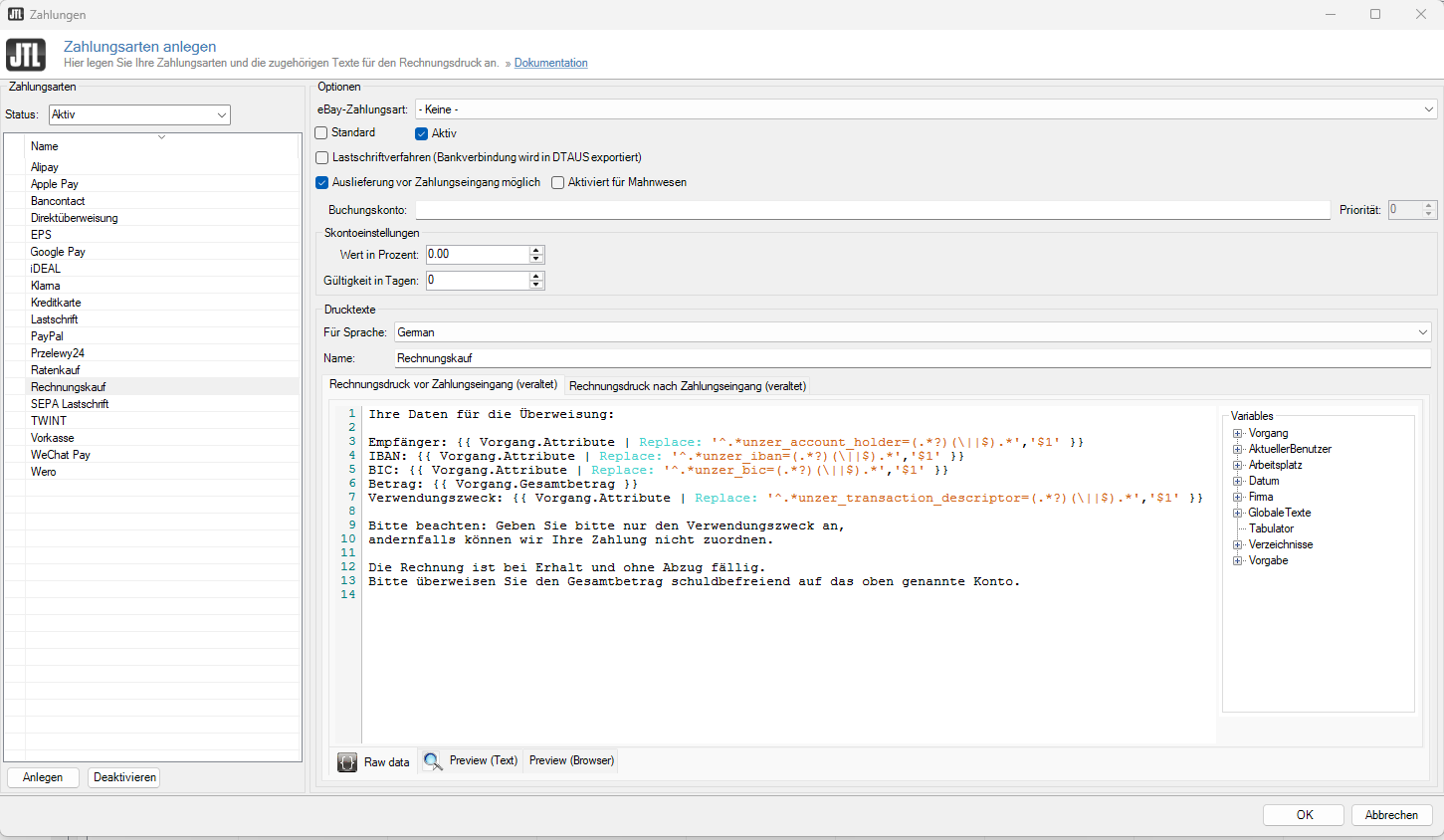
- Go to Zahlungen > Zahlungsarten.
- Create the payment methods, that you want to use, for example, Alipay.
 info
info
The payment methods must correspond to the Anzeigenamen in the JTL store. If you change the displayed name, also translate for other languages, and update here as well. - Select the Auslieferung vor Zahlungseingang möglich for the payment method Unzer Rechnung. This is necessary because the payment methods can be activated only during shipping.
2. Edit the invoice printing template
For invoices, you must update the invoice template. This is required to avoid unassigned payments or billing for the wrong accounts. The bank details to be used and the reason for payment are sent by the plugin as payment info and order attributes.
For invoices, insert the following DotLiquid code in the invoice print template.
Ihre Daten für die Überweisung:

Empfänger: {{ Vorgang.Attribute | Replace: '^.*unzer_account_holder=(.*?)(\||$).*','$1' }}
IBAN: {{ Vorgang.Attribute | Replace: '^.*unzer_iban=(.*?)(\||$).*','$1' }}
BIC: {{ Vorgang.Attribute | Replace: '^.*unzer_bic=(.*?)(\||$).*','$1' }}
Betrag: {{ Vorgang.Gesamtbetrag }}
Verwendungszweck: {{ Vorgang.Attribute | Replace: '^.*unzer_transaction_descriptor=(.*?)(\||$).*','$1' }}

Bitte beachten: Geben Sie bitte nur den Verwendungszweck an,
andernfalls können wir Ihre Zahlung nicht zuordnen.

Die Rechnung ist bei Erhalt und ohne Abzug fällig.
Bitte überweisen Sie den Gesamtbetrag schuldbefreiend auf das oben genannte Konto.
3. Create payment attributes
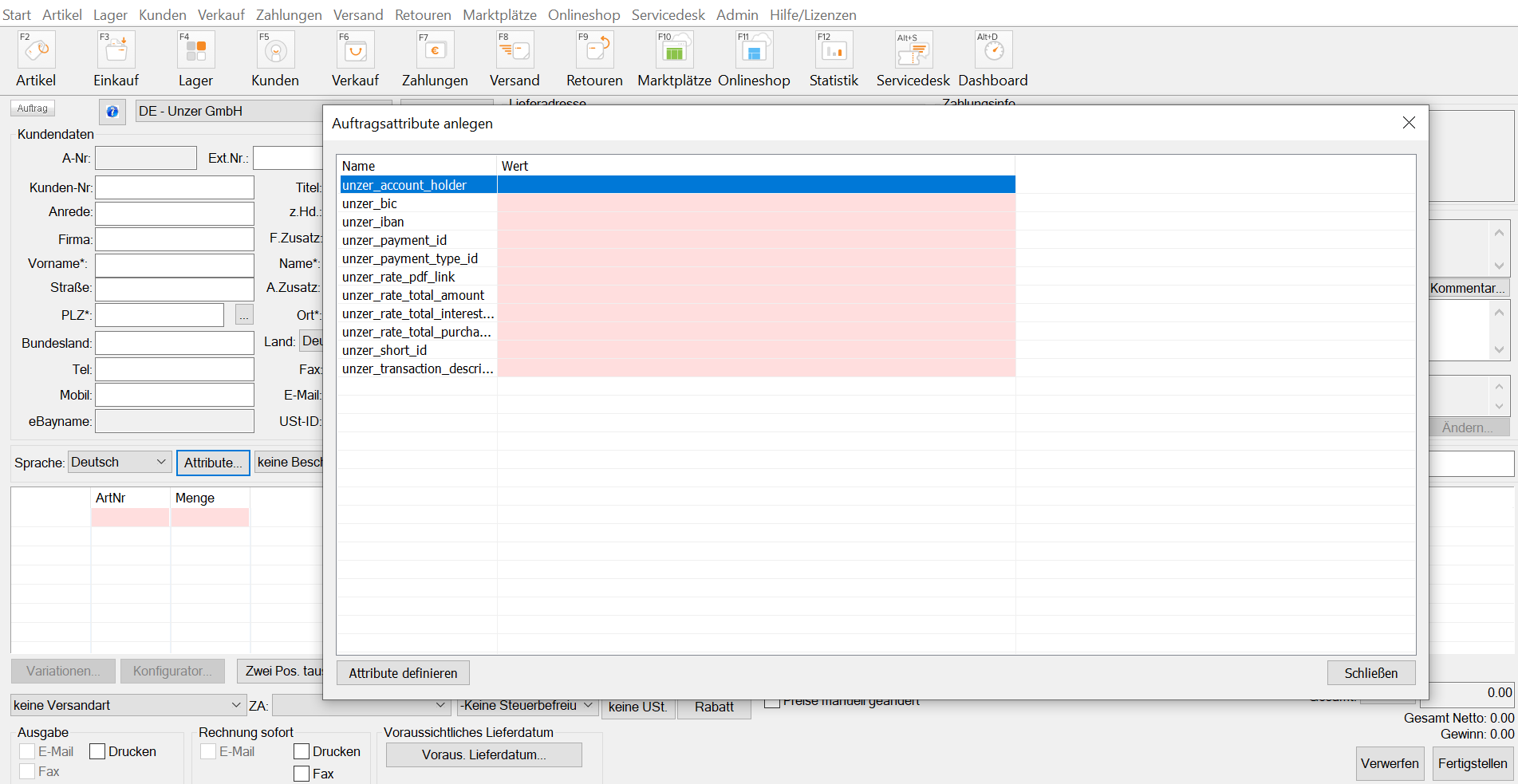
The payment information (if any) about transactions is updated by the plugin in the payment attributes. Create these attributes in Verkauf > Auftragsattribute so that you can also view them on the orders.
| Field | Description |
|---|---|
| unzer_iban | The IBAN of the Unzer account to which the customer must transfer their money. |
| unzer_bic | The BIC of the Unzer account to which the customer must transfer their money. |
| unzer_transaction_descriptor | The purpose of use of Unzer, which the customer must specify on bank transfers. |
| unzer_account_holder | The account holder of the Unzer account |
| unzer_short_id | Technical ID of the transaction from Unzer, which can be used in the Insight Portal to find the transaction. |
| unzer_payment_id | Payment ID from Unzer |
| unzer_payment_type_id | Payment method ID |
| unzer_rate_pdf_link | Link to the PDF with the information about the installment plan for the customer. |
| unzer_rate_total_amount | Total amount of the installment |
| unzer_rate_total_purchase_amount | Order amount of the installment |
| unzer_rate_total_interest_amount | Interest amount of the installment |